How to Orchestrate Multiple OpenClaw Agents Into a Team: The Complete 2026 Playbook
The patterns, tools, and hard-won lessons from the community building multi-agent systems with OpenClaw
Running one AI agent is impressive. Running a team of them—each with its own identity, memory, tools, and model—coordinated like departments in a company? That’s where OpenClaw gets genuinely powerful.
After researching 17 sources across official documentation, production deployments, and community tools, here’s the definitive guide to orchestrating multiple OpenClaw agents. No theory. Just what actually works.
The Architecture That Won: Hub-and-Spoke
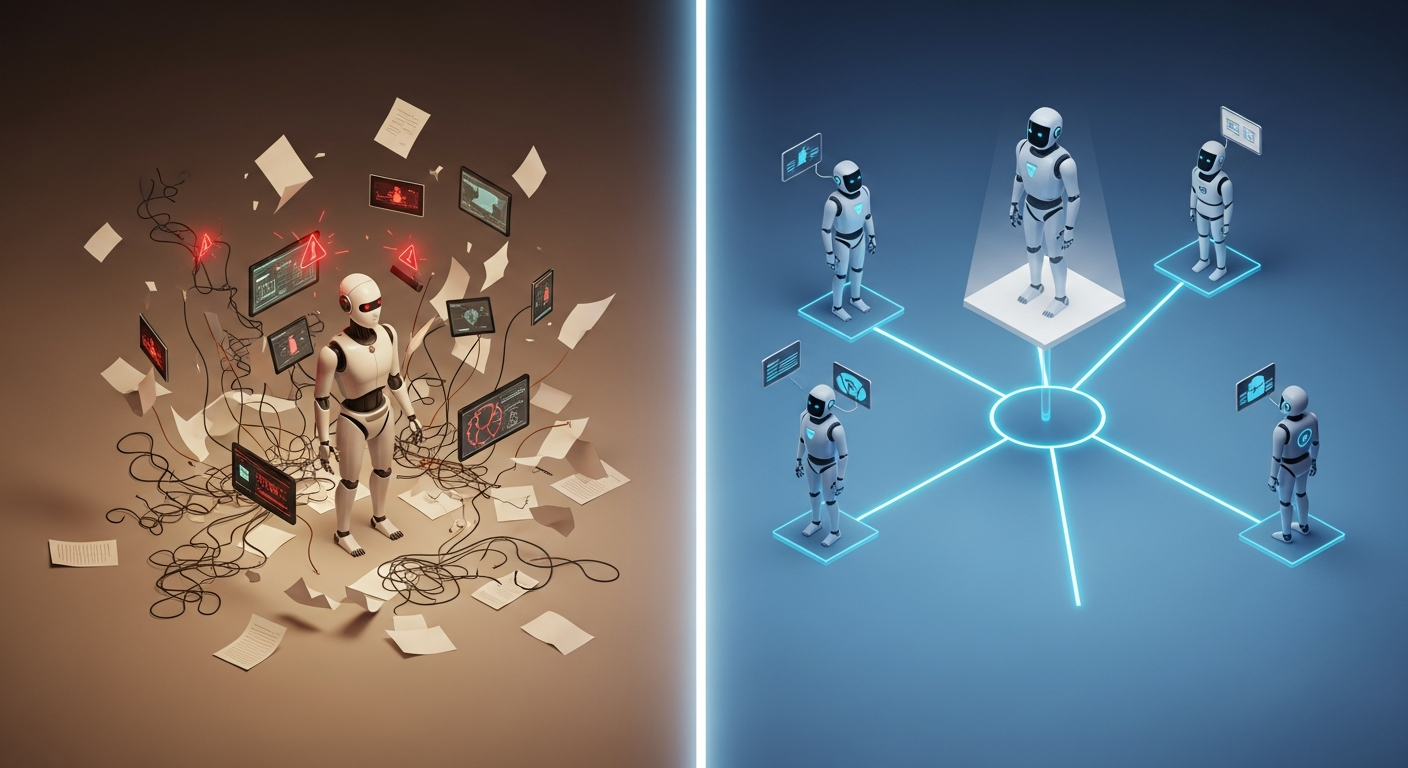
Every successful multi-agent OpenClaw deployment converges on the same pattern: one orchestrator agent delegating to specialized workers.
TheSethRose’s OpenClaw Advanced Config is the canonical example. One agent (“Seth”) handles all user interaction via Telegram while delegating to three specialists:
- Linus — Coding tasks in a Docker sandbox
- Finch — Research with web access
- Otto — Automation and cron jobs
The critical design decision: sub-agents are stateless. They have “no memory and no user context.” The orchestrator must embed all necessary context into self-contained task prompts. This prevents hallucination accumulation and keeps each delegation clean.
As the Zen Van Riel orchestration guide puts it: “The best OpenClaw deployments match architecture complexity to actual requirements. Simple needs get simple solutions.”
Five Ways Agents Communicate
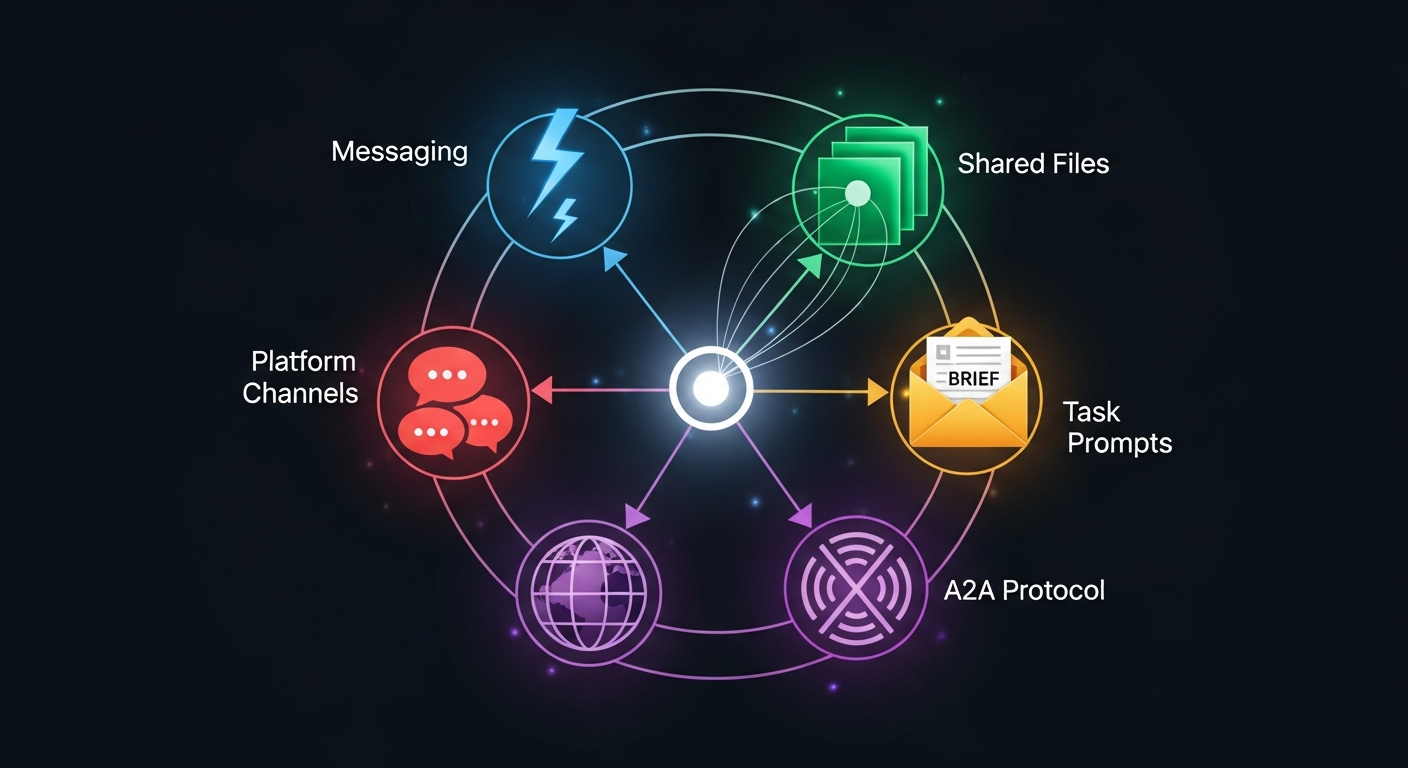
The biggest question in multi-agent orchestration isn’t what agents do—it’s how they talk to each other. OpenClaw’s ecosystem has developed five distinct communication patterns:
1. Native Agent-to-Agent Messaging
OpenClaw’s built-in tool for direct inter-agent communication. Disabled by default, requiring explicit allowlisting in your config. Best for simple two-agent setups.
2. Shared Workspace Files (Blackboard Pattern)
Clawe pioneered this: agents share symlinked files like WORKING.md for coordination while keeping personal files isolated. Network-AI formalizes it with file-system mutexes preventing write conflicts.
3. Zero-Context Task Prompts
The orchestrator’s primary tool. Each delegation is a complete brief containing instruction, context, constraints, and expected output format. No assumptions about what the sub-agent knows.
4. A2A Protocol
Google’s Agent2Agent standard enables communication between separate OpenClaw instances across networks. Still experimental in February 2026, but the foundation for cross-instance coordination.
5. Platform Channels as Coordination
The most pragmatic approach: use Telegram groups, Slack channels, or Discord servers as the coordination layer. One developer runs 7 agents coordinated through Telegram groups functioning like company departments.
The Three Tools You Should Know
Clawe — For Content Teams
A Docker Compose stack running 4 agents on 15-minute heartbeat intervals: Squad Lead, Content Editor, Designer, and SEO Specialist. Kanban task management, @mention notifications, and a web dashboard. Perfect for “always-on content factory” workflows.
Antfarm — For Development Teams
Deterministic YAML-defined workflows where agents execute in strict sequence. The feature-dev workflow runs 7 agents: plan, setup, implement, verify, test, PR, review. Zero external dependencies (“YAML + SQLite + cron” is the entire stack). Its killer feature: cross-agent verification where separate agents validate predecessor work.
“You don’t need to hire a dev team. You need to define one.”
Network-AI — For Enterprise Teams
Adds AuthGuardian (weighted permission evaluation), Swarm Guard (token budget management), and trust hierarchies to OpenClaw orchestration. When your agents need to access payments APIs or sensitive databases, this is how you gate access safely.

The Production Checklist
From OpenClaw Issue #4561, the community’s battle-tested scaling practices:
- One workspace per agent — Never share
agentDir(causes auth collisions) - Bootstrap files under 5KB — They’re injected every run
- Enable cache-TTL pruning — 5-minute TTL prevents token bloat
- Per-agent tool deny lists — Restrict what each agent can access
- Sandbox untrusted agents — Docker containers with
mode: "all" - Write memories to files — Not mental notes
- Load skills on-demand — Instructions load via
read, not injection - Monitor token usage —
/statusand/context listcommands - Separate browser profiles — For parallel web operations
- Smart model selection — Opus for orchestrator, Haiku for routine tasks (70-80% cost savings)
The Security Question
The ecosystem’s most active debate: OpenClaw uses application-level security (allowlists, tool deny lists, sandbox modes). NanoClaw uses OS-level container isolation where agents literally cannot access files outside their mount.
For multi-agent setups, the recommendation is clear: sandbox every agent that doesn’t need host access. The orchestrator may need full permissions; workers almost never do.
What’s Coming Next
The Agent Teams RFC proposes adding native multi-agent coordination to OpenClaw core: parallel task execution with dependency graphs, mailbox-based inter-agent messaging, broadcast capabilities, and coordinator modes (participating vs. delegating). Estimated timeline: Q3 2026.
Meanwhile, DigitalOcean’s managed OpenClaw offering provides elastic scaling for production multi-agent deployments with cost predictability and zero-downtime updates.

The Bottom Line
Start with one agent. Exhaust its capabilities. When you hit a genuine isolation requirement—different security contexts, specialized tools, or cost optimization through model tiering—add a second agent with the hub-and-spoke pattern.
Choose your coordination tool based on your domain: Clawe for content, Antfarm for development, Network-AI for enterprise. Follow the production checklist. Manage your tokens aggressively.
Multi-agent orchestration with OpenClaw is where microservices was in 2015: the patterns are emerging, the tooling is maturing fast, and the teams that start learning now will have a significant advantage.
The agents are ready. The question is whether you’ll organize them into a team—or just a crowd.
Ready for always-on multi-agent deployment without managing infrastructure? Deploy your first agent team at Augmi.world.